One business system. One AI that works with you.
Rufio works with the customers, jobs, schedules, and rules you choose to connect. Ask it to investigate, prepare work, change a supported process, or automate a routine. You set the direction and decide what happens next.
Connected information
The full story, ready when you need it.
A question about a customer can draw on their messages, quotes, appointments, and invoices. Rufio can prepare the next step with that history attached, following your rules.
The bot stack
Five assistants. Five separate contexts.
One Rufio
One system that shares the context.
Customer history, your working rules, and your permissions stay connected from question to action.
Memory
It starts with a foundation. You make it yours.
Day one
Rufio starts with records and workflows common to your kind of business. You decide what fits, what needs changing, and what makes your business different.
Every day after
Teach Rufio your preferences as you work together. Save your wording, customer notes, and pricing rules so it can use them next time. Review and update those details whenever things change.
Month three
More of the context you have shared is ready to use: regular customers, agreed rates, seasonal plans, and follow-ups. Rufio can connect those details and surface possibilities for you to weigh with your experience.
Day one
Name
Mrs. Alvarez
Type
Regular — standing Thursdays
Every day after
Name
Mrs. Alvarez
Type
Regular — standing Thursdays
Payment
Card ······4242
Pays by
Check
Notes
Prefers morning calls. Never book Sundays.
+ Learned: Always pays by check
Month three
Name
Mrs. Alvarez
Type
Regular — standing Thursdays
Payment
Card ······4242
Pays by
Check
Notes
Prefers morning calls. Never book Sundays.
Illustrative example of how one customer’s saved context can grow — not a capture of a specific business.
Your saved business context stays in your dedicated setup. You choose who on your team can access it. → Security
The interface
The interface is a conversation.
Working in conversation: ask questions, prepare and approve the day's work. Changing the system in conversation: describe the form, workflow, report, or page you need, and Rufio prepares the change for you to inspect, adjust, and approve before it affects your business.
Text it.
“Push Thursday’s 2pm to Friday and prepare the message for me.” Check the details, adjust the wording, and send when you are ready.
Say it.
Hands full? Use voice where your setup supports it — the truck, the studio, the kitchen. Same AI, same memory, out loud.
See it.
Sometimes looking beats asking. The desk — your schedule, inbox, work, customers, money — shows the records Rufio keeps updated as work is approved; you open it when you want the picture.
Ask for the records and work Rufio supports by name, then open the desk when looking is faster. The app is the map. The conversation is the steering wheel.
The map
See the business and the conversation together.
Open the desk when scanning the schedule, inbox, work, customers, or money is faster than asking. The annotations point to the AI-specific parts of the interface.
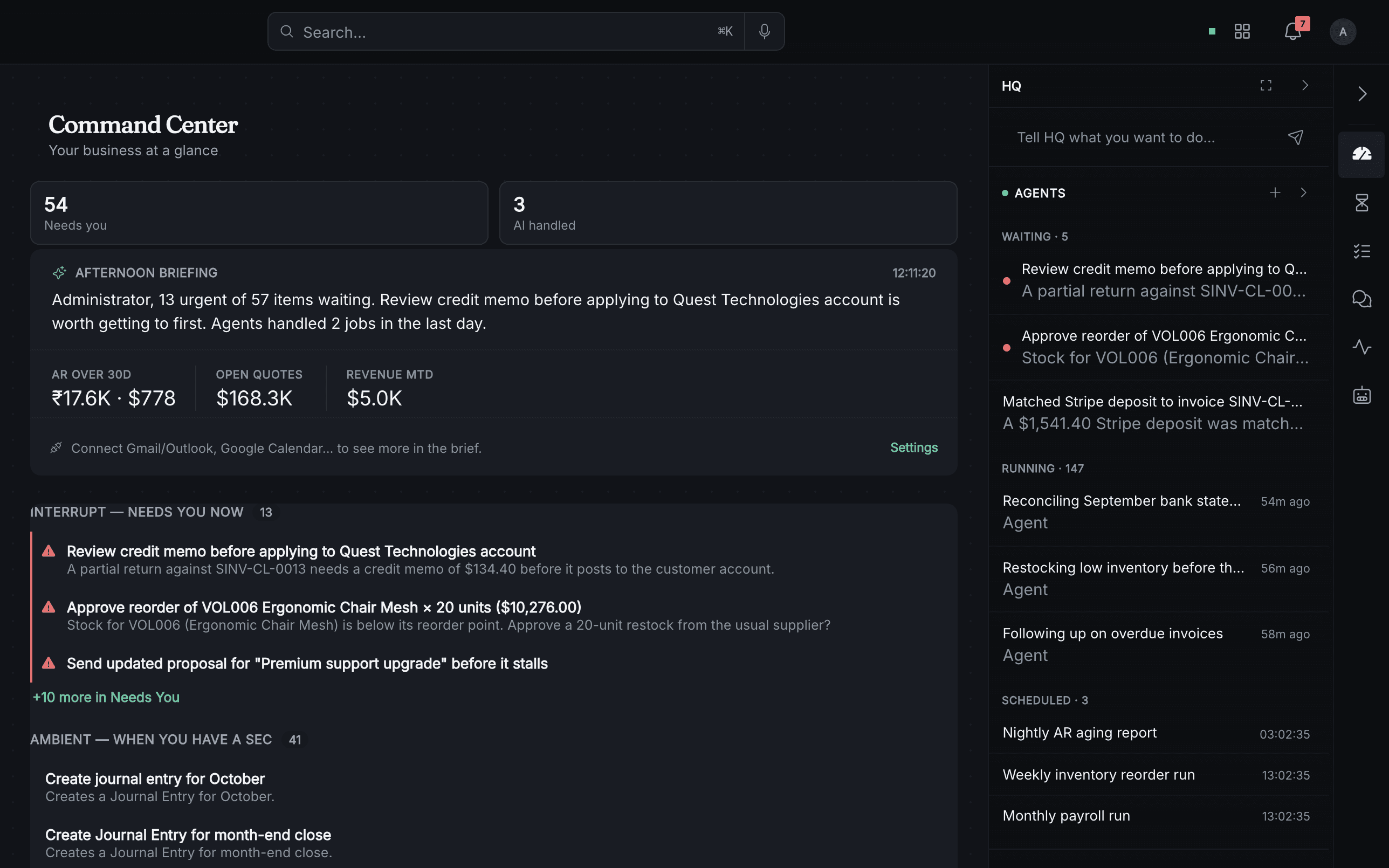
- 1Your briefingSee a summary of current work and items that may need your attention.
- 2Rufio beside your workKeep the conversation and relevant details alongside the work you are looking at.
From request to review
One request. Several steps, connected.
Say “invoice Riverside for Tuesday’s work” and Rufio can gather the appointment details, apply your rates, draft the invoice, and prepare the reminder. Review them together, change anything you need, and approve the next step. The invoice and activity stay connected to the customer record.
You say:
“Invoice Riverside for Tuesday’s work.”
1. Pulls appointment
9:02:14 AM — sourced from schedule
Tuesday·3hr·$85/hr
2. Applies your rates
9:02:15 AM — rate table: Standard
3hr × $85/hr = $255
3. Drafts invoice
9:02:17 AM — draft created
Invoice #2847 · $255
4. Queues approval
9:02:17 AM — parked for review
Waiting for your OK
5. Prepares reminder
9:02:18 AM — waiting with invoice
Reminder will follow your approved payment terms
6. Notes timeline
9:02:18 AM — customer timeline updated
Added to Riverside record
Illustrative sequence — one supported request moving through connected records, with the approval step kept visible.
- 01Nothing is a black box.Every action is recorded: what happened, when, why, and which records changed.
- 02Calculated from your records.Invoice totals use the rates and work details in your records. You can inspect the inputs as well as the result.
Your permissions, task by task
You decide what runs on its own. Task by task.
Every kind of task Rufio does sits at one of three levels — and you control the dial for each one independently:
Suggest.
Rufio prepares the work and waits for your approval. Keep a task here for as long as you want.
Review.
When you authorize this level, Rufio carries out the task within your rules, then shows you the result. Choose Suggest if you want to approve each action first.
Automate.
Routines you enable run within your rules, with activity available to review. You choose the task, timing, and limits, and can pause or change them.
Appointment reminders
Automate
Invoice drafting
Review
New-customer quotes
Suggest
The mechanics:
- •The dial is per task-type, not global. Invoice drafting can be fully automated while quotes still wait for your approval forever, if that’s how you want it.
- •Rufio can suggest a change in permissions. You decide whether to allow it. More automation is always optional.
- •Any dial turns back down, instantly. One sentence: “Check with me on invoices again.”
Hard lines
Some things it will never do.
It never moves money on its own. You can choose to automate sending invoices; paying anything, refunding anything, or changing your prices always requires you.
It never commits you to work without your OK. It can hold a time slot with a caller; confirming the booking follows the rules you set — and defaults to asking you.
It never signs anything. Contracts and agreements are drafted for you, never executed by it.
It never invents new behavior. New automations and new patterns are proposed to you, in plain language, before they exist. Rufio doesn’t freelance.
It never shares your business. Your data lives in your own isolated instance. It isn’t training data, it isn’t pooled, and it leaves with you if you go. → Security
An AI you can trust isn’t one that can do everything. It’s one that’s clear about what it won’t.